Referring to this video https://www.loom.com/share/b18211e74bf9492396701714710b94ed [ Timestamp 17m30s-18m00s ]
Instead of choosing a different linked variable, is it possible to update the colour of the currently linked variable using the colour picker without leaving the designer window, such that you get a live preview of your colour choice?
Yes @razorpig you can update the color of the linked variable using the color picker, that way you don’t have to go back to the variables panel. I hope this helps!
Thanks @Pablo_Cortes. I’m still stuck.
I just can’t figure out where to click to bring up the color picker without going to the variables panel. This is the set up :
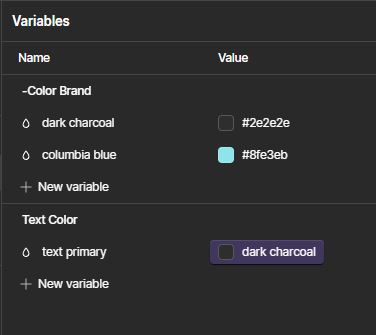

In the styles panel clicking on the swatch next to “text primary” just brings up the variable selector, not the color picker :
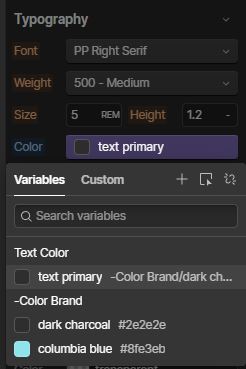
Similarly if I click on the little pen icon to the right of “text primary” (not shown) to edit the linked variable, again it just brings up the menu of variables :

How do I access the color picker to edit the linked variable color while remaining in the designer window so I can preview the changes?
My apologies if I missed something obvious - which is always a distinct possibility ! 
Many thanks again 
@Pablo_Cortes Many thanks again. Really appreciate it. The issue is with linked variables - I don’t know if that’s the correct term for it. Sorry if I wasn’t very clear in my initial post. I’ll try to clarify. Referring to this image :
If I was trying to update dark charcoal or columbia blue then your solution works great, but I’m using the client-first methodology from Finsweet where you first define your base colours (dark charcoal and columbia blue in this example) and then link to them with semantic colours (text primary in this example).
So when an element has a semantic colour applied, I’d like to update the base colour that it’s linked to live in the viewport using the colour picker. I just can’t figure out how to do it.
Hey @razorpig, so what you can do is simply pick your base color variant, edit it with the steps I mentioned, and once you are done change it to the new variable, the base color should update. I hope this helps.
2 Likes
Oh of course ! Thank you so much. Now I feel dumb. I said in my earlier post I probably missed something obvious.
It’s quite a few clicks and definitely feels like a step backwards in terms of UX, but I can live with it for now. Hopefully they’ll sort it out.
Thanks again.
1 Like


