Hi everyone — How can I get with the Designer API the Body HTML tag (all pages)?

Hey @Flaka_Kallaba ,
If you want the style name for the Body (All Pages) selector that we see, it’s style name is ‘body’.
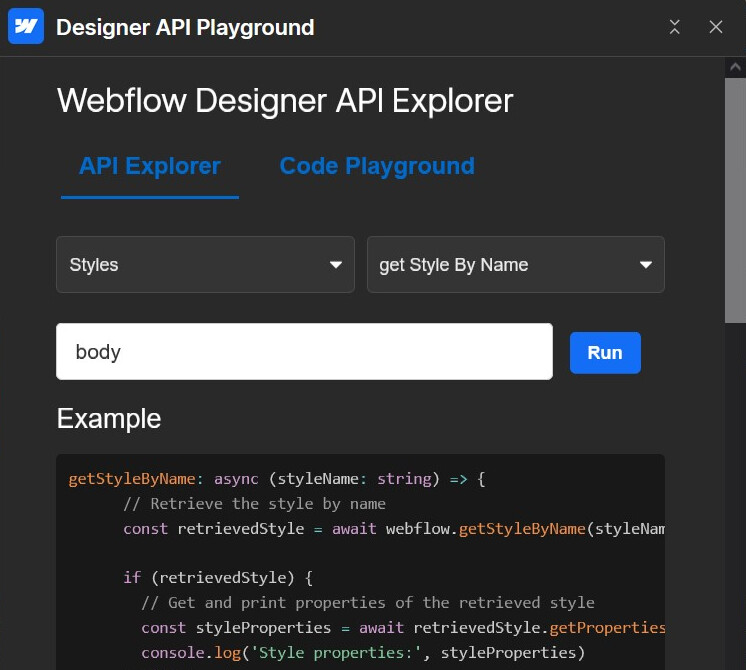
You should be able to get its styling properties as output by fetching it via this method and you can explore further in terms of your requirement.
Hope this gives you some idea. Let us know if you mean something else.
Hey
Thanks for the reply  . I tried this, but it doesn’t seem to work as expected. When I create a blank project (without editing anything) and call this method, the body style is not found.

However, once I go into the Designer and select the HTML tag Body (All Pages) (without making any change), then if I call the method again, it does find the body class.

So it seems like it only becomes available after selecting it in the Designer, not by default. I need to be able to get this without selecting it manually.
Hey @Flaka_Kallaba ,
Yes, I tested this out and found the same result. It seems the method only retrieves the user created / applied styles and not the default styling selectors / tag selectors as of now.
And it does recognize that ‘body’ is a reserved word so naturally it does not allow us to create a style for the same but I was not able to find a way / method in the Designer API docs to retrieve the default styling unless it’s specifically applied, so curious if this is actually possible as of now 
Sorry to step in in this discussion but why you need global styling of body element? If we would not talk about basic browser styling props (over 800) the body has only a few props (depends on what you assign to it). This function that should run after page load will search thru codebase to find any stylesheet and return only these props that are applied to body.
function getBodyCSSRules(): BodyCSSRuleSummary[] {
			const summaries: BodyCSSRuleSummary[] = [];
			const selectorTargetsBody = (selectorText: string | undefined) => {
				if (!selectorText) return false;
				return selectorText.split(',').some((selector) => /\bbody\b/.test(selector.trim()));
			};

			const computedBody = getComputedStyle(document.body);
			const computedRoot = getComputedStyle(document.documentElement);
			const varRegex = /var\((--[A-Za-z0-9-_]+)(?:,\s*([^()]*?))?\)/g;

			const getVariableValue = (name: string): string => {
				const fromBody = computedBody.getPropertyValue(name)?.trim();
				if (fromBody) return fromBody;
				const fromRoot = computedRoot.getPropertyValue(name)?.trim();
				if (fromRoot) return fromRoot;
				return '';
			};
// if there are applied variables on prop it will display its value instead of variable name
			const resolveVariables = (value: string, depth = 0): string => {
				if (!value || depth > 10) return value.trim();
				let replaced = value;
				let hadMatch = false;
				replaced = replaced.replace(varRegex, (_match, varName: string, fallback?: string) => {
					hadMatch = true;
					const resolved = getVariableValue(varName);
					if (resolved) {
						return resolveVariables(resolved, depth + 1);
					}
					if (fallback) {
						return resolveVariables(fallback.trim(), depth + 1);
					}
					return '';
				});
				return hadMatch ? resolveVariables(replaced, depth + 1) : replaced.trim();
			};

			type RuleWithNestedRules = CSSRule & { cssRules?: CSSRuleList };
			const isRuleWithNestedRules = (rule: CSSRule): rule is RuleWithNestedRules =>
				'cssRules' in rule;

			const describeGroupingRule = (rule: RuleWithNestedRules): string => {
				if (
					'conditionText' in rule &&
					typeof (rule as CSSConditionRule).conditionText === 'string'
				) {
					const condition = (rule as CSSConditionRule).conditionText.trim();
					if (rule instanceof CSSMediaRule) {
						return `@media ${condition}`;
					}
					if (typeof CSSSupportsRule !== 'undefined' && rule instanceof CSSSupportsRule) {
						return `@supports ${condition}`;
					}
					const ctorName = rule.constructor?.name;
					if (ctorName) {
						return `@${ctorName.replace(/Rule$/, '').toLowerCase()} ${condition}`.trim();
					}
				}
				if (
					'name' in rule &&
					typeof (rule as { name?: string }).name === 'string' &&
					(rule as { name?: string }).name
				) {
					const name = (rule as { name: string }).name;
					if (typeof CSSKeyframesRule !== 'undefined' && rule instanceof CSSKeyframesRule) {
						return `@keyframes ${name}`;
					}
					return `@${rule.constructor.name.replace(/Rule$/, '').toLowerCase()} ${name}`.trim();
				}
				const cssText = rule.cssText ?? '';
				const braceIndex = cssText.indexOf('{');
				return braceIndex >= 0 ? cssText.slice(0, braceIndex).trim() : cssText.trim();
			};

			const summariseStyleRule = (rule: CSSStyleRule, context: string[], origin: string) => {
				if (!selectorTargetsBody(rule.selectorText)) return;
				const declarations: Record<string, string> = {};
				for (const propertyName of Array.from(rule.style)) {
					const rawValue = rule.style.getPropertyValue(propertyName).trim();
					const priority = rule.style.getPropertyPriority(propertyName);
					const resolved = resolveVariables(rawValue);
					declarations[propertyName] = priority ? `${resolved} !important` : resolved;
				}
				if (Object.keys(declarations).length === 0) return;
				summaries.push({
					selector: rule.selectorText,
					declarations,
					context: context.length ? [...context] : undefined,
					origin
				});
			};

			const collectRules = (
				ruleList: CSSRuleList | undefined,
				context: string[],
				origin: string
			) => {
				if (!ruleList) return;
				for (const rule of Array.from(ruleList)) {
					if (rule instanceof CSSStyleRule) {
						summariseStyleRule(rule, context, origin);
					} else if (rule instanceof CSSImportRule) {
						try {
							collectRules(rule.styleSheet?.cssRules, context, rule.href ?? origin);
						} catch (error) {
							console.warn('Could not access imported stylesheet:', rule.href, error);
						}
					} else if (isRuleWithNestedRules(rule) && rule.cssRules) {
						const described = describeGroupingRule(rule);
						const nextContext = described ? [...context, described] : context;
						collectRules(rule.cssRules, nextContext, origin);
					}
				}
			};

			for (const sheet of Array.from(document.styleSheets)) {
				try {
					collectRules(sheet.cssRules, [], sheet.href ?? '[inline]');
				} catch (error) {
					console.warn('Could not access stylesheet:', sheet.href ?? '[inline]', error);
				}
			}

			const inlineStyle = document.body.getAttribute('style');
			if (inlineStyle) {
				const temp = document.createElement('div');
				temp.setAttribute('style', inlineStyle);
				const declarations: Record<string, string> = {};
				for (const propertyName of Array.from(temp.style)) {
					const rawValue = temp.style.getPropertyValue(propertyName).trim();
					const priority = temp.style.getPropertyPriority(propertyName);
					const resolved = resolveVariables(rawValue);
					declarations[propertyName] = priority ? `${resolved} !important` : resolved;
				}
				if (Object.keys(declarations).length > 0) {
					summaries.push({
						selector: 'body',
						declarations,
						context: ['inline-style'],
						origin: '[inline]'
					});
				}
			}

			if (!summaries.length) {
				console.info(
					'No explicit body selectors found; consider inspecting computed styles instead.'
				);
			}

			return summaries;
		}

		// Generate a structured log so the console output is easy to scan and expand.
		const bodyCSSSummaries = getBodyCSSRules();

		const logBodyCSSRules = (summaries: BodyCSSRuleSummary[]) => {
			console.groupCollapsed(`Global body CSS rules (${summaries.length})`);
			summaries.forEach((summary, index) => {
				// Compose a human-readable title that lists the selector and any contextual nesting.
				const titleParts = [`#${index + 1}`, summary.selector.trim()];
				if (summary.context?.length) {
					titleParts.push(`within ${summary.context.join(' › ')}`);
				}
				console.group(titleParts.join(' — '));
				// Capture the stylesheet (or inline) origin so we can jump to it quickly.
				console.log('Origin:', summary.origin);
				if (summary.context?.length) {
					// Context shows the cascade of @media / @supports wrappers.
					console.log('Context chain:', summary.context);
				}
				// Transform the declarations map into rows so console.table can render a neat grid.
				const declarationRows = Object.entries(summary.declarations).map(([property, value]) => ({
					property,
					value
				}));
				if (declarationRows.length) {
					console.table(declarationRows);
				} else {
					console.info('No declarations found (likely overridden or empty rule).');
				}
				console.groupEnd();
			});
			if (!summaries.length) {
				console.info('No body-targeted rules were discovered.');
			}
			console.groupEnd();
		};

		logBodyCSSRules(bodyCSSSummaries);
Table of CSS Rules applied only to body in console example:

Hope this will help but still do not understand the purpose of it