Serious Reliability Problems with CMS and Locales

Hi everyone,

I’m not really used to posting here, but at this point I’m honestly exhausted and frustrated. I’ve been using Webflow for three years now and the CMS has been consistently unreliable in ways that are incredibly time-consuming.

There are constant issues when editing CMS fields. Sometimes typing a single letter will randomly delete an entire word. Very often, I’ll make edits in a CMS item, I save, I double-check that it’s saved, then I publish the site… and when I come back five minutes later, the change is just gone. I have to redo everything. This is something that happens DAILY, not occasionally.

The situation is even worse with Locales. I’ll translate content carefully, save, publish — and then the next day the translation simply no longer exists. It’s extremely frustrating, especially considering the additional cost per locale. When you pay that much for multi-language support, the very minimum expectation is that changes are stored reliably.

At this point, using the CMS has become genuinely horrible. When I look at what competitors are offering today, it’s very hard not to consider switching. I really hope the upcoming “Next Gen CMS” is not just marketing and will actually address these core stability issues — because right now, the experience feels unacceptable for the price we’re paying.

To stay constructive: is there a reliable workflow to ensure CMS changes are truly saved?

I already wait every time for the “Saved / Autosaved” indicator, I manually click publish on the item, and I also publish the whole site afterwards — and still, content disappears. Every day.

If there is any recommended best practice, confirmation step, or debugging method to guarantee that edits are not lost, I would really appreciate guidance.

Thanks.
1 Like

Still no answer from Webflow. Not a single word. And honestly, that says a lot about the current state and quality of this tool.

I’ve been telling people for a long time now to move away from Webflow, and this just reinforces it. At this point, it’s so much more efficient to code your site yourself with something like Cursor or Antigravity than to rely on a CMS that randomly loses content and offers zero support in return.

Webflow forums are community supported and not an official support channel. Complex issues require at least a read-only share so someone else could at least test to see if they get the same behavior.

Issues are commonly related to browsers, browser versions, extensions installed. I debug using Chrome in private mode with no extensions. Something worth a try.

Obviously others are not experiencing the same day to day issues as you or the forum would be in full crisis mode. Jeff’s advice is solid, and 99% of the time it’s a browser extension that’s breaking the Webflow designer.

Other self-help things- clear your browser cache, enable/disable VPN access, disable new features like the simultaneous editor access.

But most importantly you need to open a support ticket if you’re unable to identify your connection issue.

1 Like

Thanks a lot for your replies.

I know the usual theory that these issues are “probably caused by browser extensions,” but I really don’t think that’s what’s happening here. I’ve tested multiple times in Chrome Incognito with zero extensions enabled, and I get exactly the same problems. So it’s clearly not extension-related — it’s something much deeper in the way Webflow’s text editor and its whole Locales system are built.

There are dozens of examples I could give. I run into issues every single day. They’re not always “big” bugs, but they’re constant small bugs that stack up and waste a huge amount of time. And I’m pretty sure many other users have similar issues but simply don’t bother posting on the forum because they’re minor in isolation — but extremely painful when you hit them daily.

Let me share just one example from this morning, with screenshots.

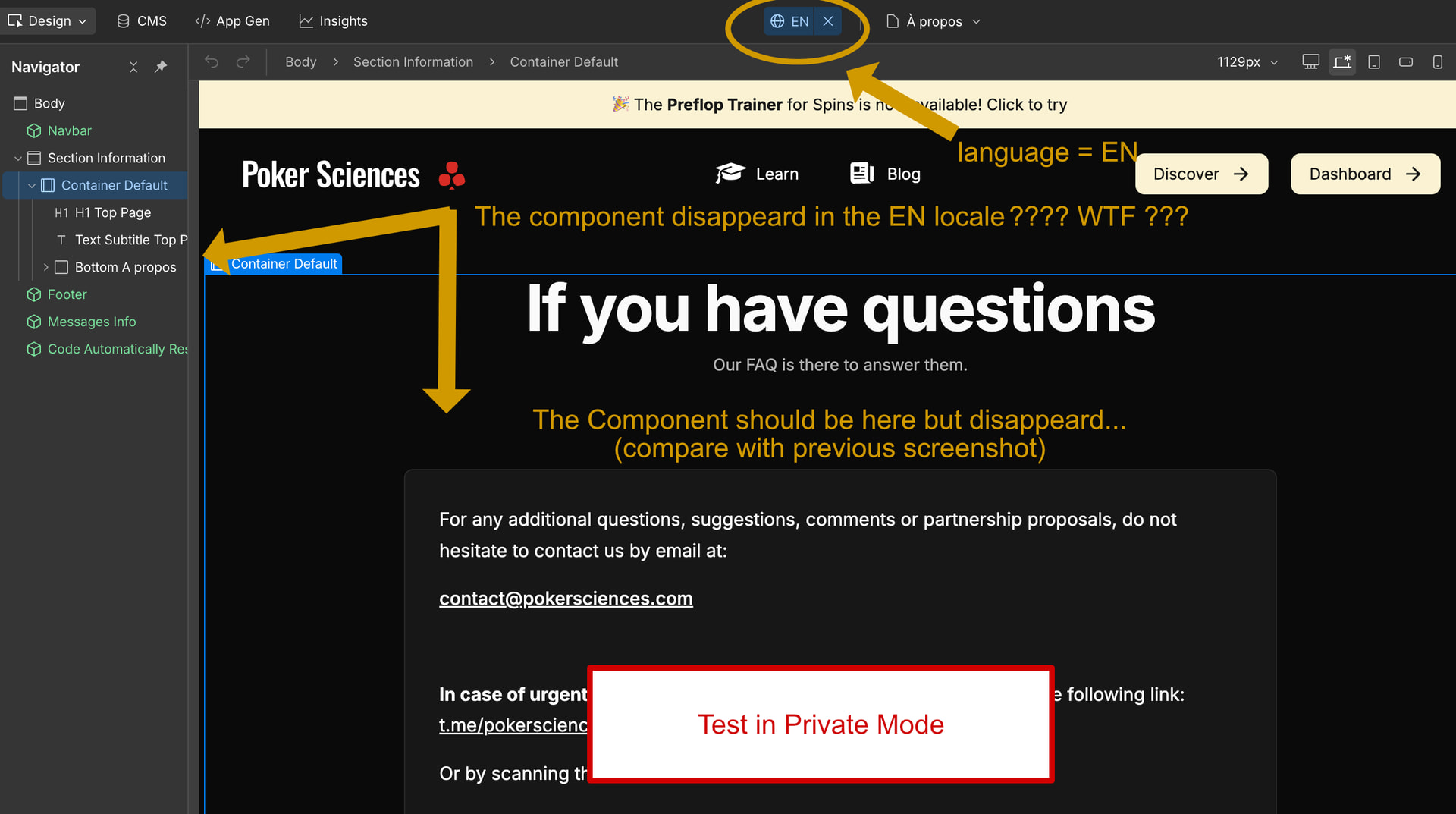
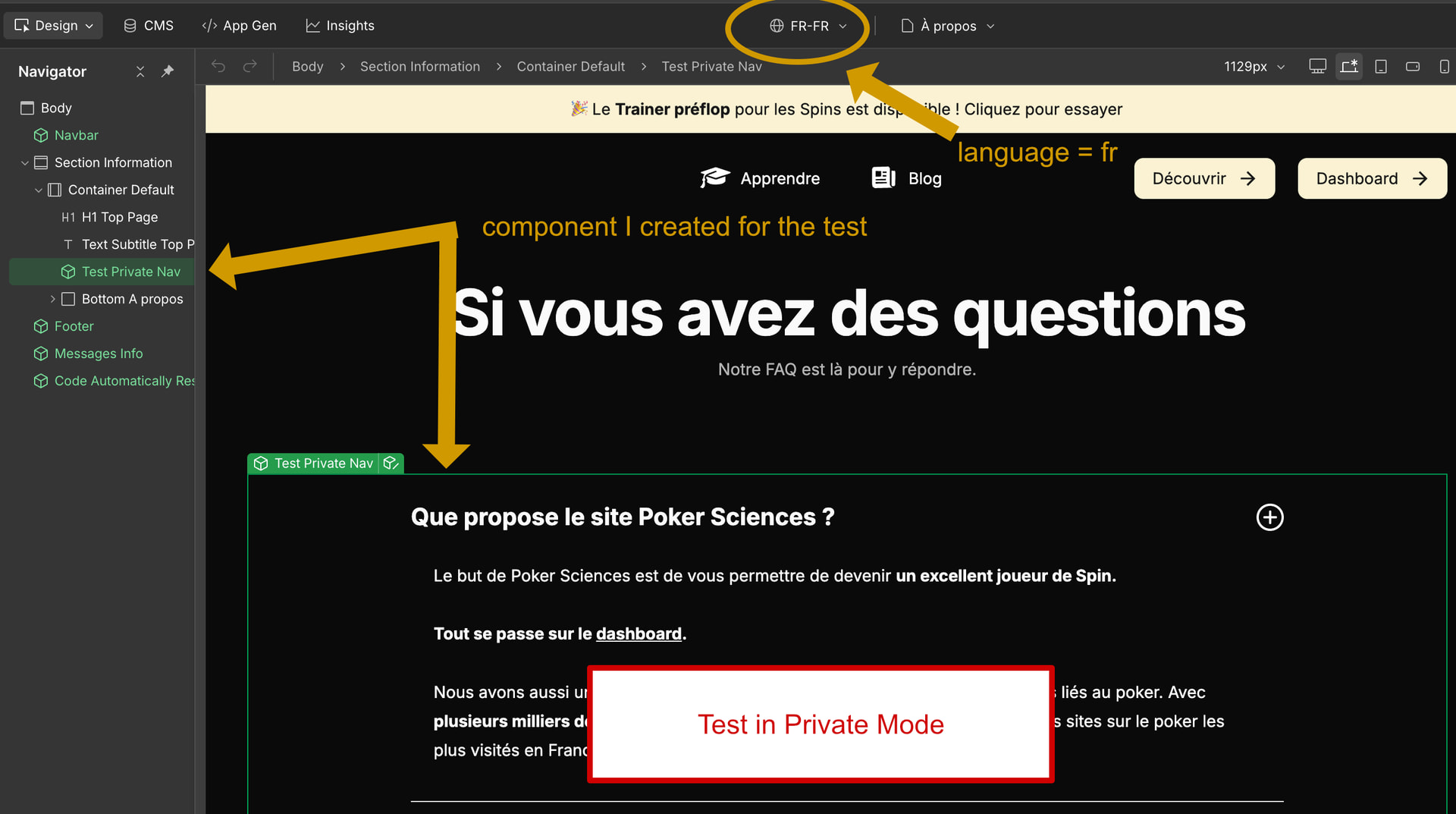
  • On the first screenshot, you can see a component I created. Before turning it into a component, that block was translated correctly into all my locales. My main locale is FR, but I also have EN and ES. Everything was fine in all three versions.

  • When I switch to the EN locale (second screenshot), the component has simply disappeared on the EN version. No warning, no error, nothing. It’s just gone. And now I have to retranslate everything manually.

This kind of thing happens constantly.

Webflow Locales is extremely buggy, and this is just one example among dozens.

I could also mention the fact that Webflow’s automatic translations are honestly unusable, so I translate everything manually with ChatGPT. But when I paste the translated text into Webflow’s editor, it never works properly.

Sometimes pasting text deletes other lines, sometimes it refuses to add line breaks, sometimes it merges paragraphs together.

I even found a ridiculous workaround:

I leave two letters in the field, then I paste the ChatGPT translation between those two letters, and then I delete the letters. It’s the only way I’ve found to paste text reliably without Webflow’s editor breaking something.

To be clear: I’ve tested all of this in private browsing with no extensions at all — nothing changes. So please don’t tell me it’s an extension issue. It’s not. The problem is clearly on Webflow’s side.

@Olivier_Martin Did you report your issues to the Webflow Support (not in the forum)?
Posting it here is good, but Webflow staff doesn’t ready it actively. Its possible that they just aren’t aware of the issues.

I never used the Locales feature, but I also had to deal with bugs in the CMS where it just deleted content.

In my example I had a CMS list with a few input fields (album name, artist name, number, etc.). Now when I added a new item to the list and filled all the input-fields, after clicking on “Create draft“ it just deleted whatever number I’ve written into the number field.

Thanks for your answer :slightly_smiling_face:

I actually did contact Webflow Support already, but I didn’t get a satisfying response.

It’s not really one specific issue — it’s more like a collection of recurring problems. I could easily list more than ten different bugs with Locales, CMS, etc.