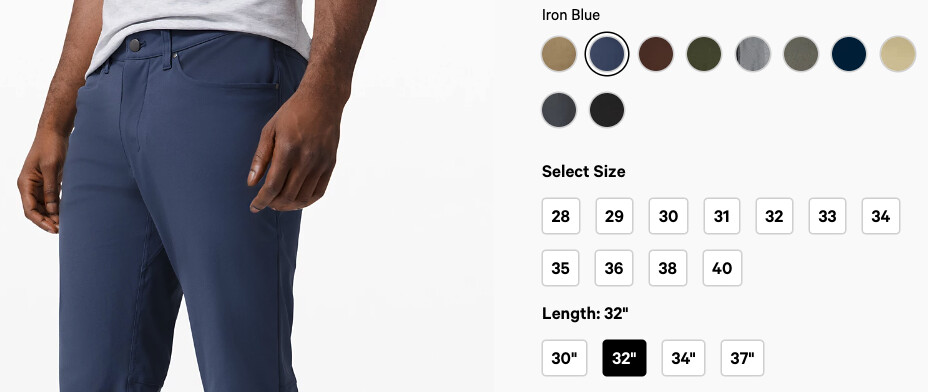
I’m looking for a way so that my customers can select their variant directly on the page as opposed to dropdown (therefore eliminating two unnecessary clicks. The final result would be more like this:
You’re in luck, Webflow recently released a feature that allows for you to switch between dropdowns or buttons for your variant options:
Since this overrides the way that the old implementation works, you’ll need to add a new “Add to Cart” element to your project page in order to see the toggle:
If you’ve applied any styles, make sure your new element has those same class names applied (it may help to keep the old “Add to Cart” element while you migrate the styles over), and then select the “Option” or “Option List” parent container to see the new toggle in the Settings panel to the right:
Once you’ve chosen the “Buttons” option, you’ll be able to style the buttons just like you can with any other element in the Designer.
Feel free to reach out if you get stuck or have any questions
Hi again Mikey,
The original issue was solved, thanks! I now have another problem.
My product has two variables, color and size. I have added the appropriate pictures to each variant. However, the picture only changes when I select both variables. Is there a way so that the picture changes as soon as they select the color? Maybe hace a default size always selected?
I’ve attached a video: https://vimeo.com/483614949
Hey @rmarcosb did you manage to achieve separate styling for each variant option list (e.g. size & colour). Trying to do this myself now… is it possible?
Running into a similar issue where I can not get the Variant image to show up. The text (Name) outputs fine, but the Image does not. Default is set as well. Any help would be great.
This is not solved!
I have read nearly every forum post on this issue and none of them are solved.
I have a default variant set (color)
I have the updated add-to cart button (it was from a theme purchased two years ago anyway)