Hello everyone!
The homepage’s hero of a site I’m working on is cutting off in the Mobile (L) breakpoint for no apparent reason. I’ve tried everything I know to fix it but nothing worked so I guess it’s not in the scope of my knowledge.
Could somebody help me, please?
Here’s the read-only link: Webflow - Psicóloga Joseane Flores
If you want you can give me some feedback on the design also.
It sounds like the hero section is being clipped because of how its height is set at the Mobile (L) breakpoint. A few common causes and fixes you can check:
Check height/overflow settings
If the hero container has a fixed height (e.g., height: 100vh), some mobile browsers calculate 100vh differently because of their address bar. Try switching to min-height: 100vh or using min-height: 100svh (the newer “safe viewport height” unit).
Make sure overflow: hidden isn’t applied on the wrong parent container, as that can clip child elements.
Inspect padding/margins in mobile breakpoint
Sometimes elements inside the hero (like headings or buttons) have negative margins or large padding that pushes content outside the container.
Use the browser’s dev tools in mobile view to see if anything is overflowing.
Check for absolutely positioned elements
If an image or background is absolutely positioned without proper height constraints, it can appear cut off on certain breakpoints.
Background images vs. inline images
If you’re using background-size: cover; and a fixed height, the image can appear cropped differently depending on screen height.
Consider making the hero responsive with flex or grid instead of a fixed height.
If none of these solve it, share a link or screenshot so others can inspect the HTML/CSS — it’s often a small style rule at the mobile breakpoint causing the issue.
And here’s the part of the code that I could print, because I don’t have that specific plan that allows you to see the full code and export it.
I hope any of these information can help.
Thank you SO much for helping me! I truly appreciate it.
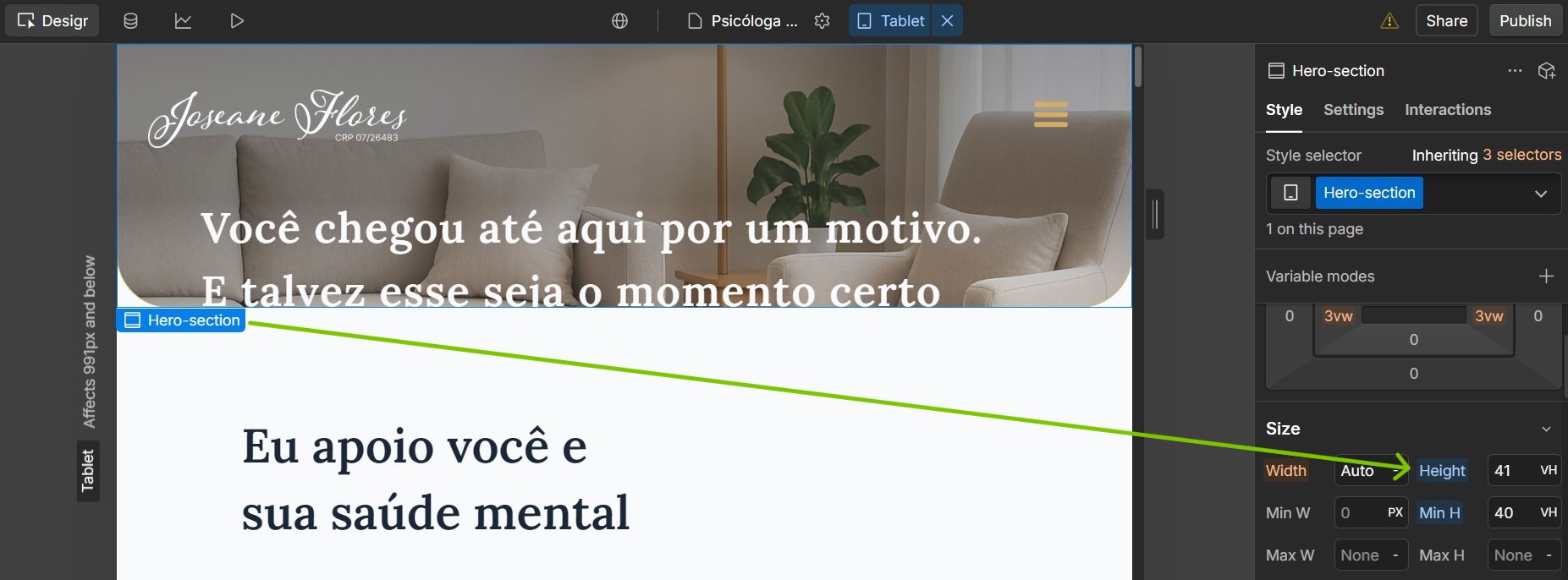
Can you reset the Height value for the ‘Hero-section’ element like how its set for other breakpoints? Currently its set to 41vh as shown in the screenshot.