Hello, i am completely new to webflow. I just wanted a simple template that I could edit for my website. found one that i like. in editor the navbar is white background with black text. but when i click preview or publish it changes to transparent background with white text. This doesn’t work as my logo has black text and the hero image makes it hard to read. Can anyone tell me why this is happening?
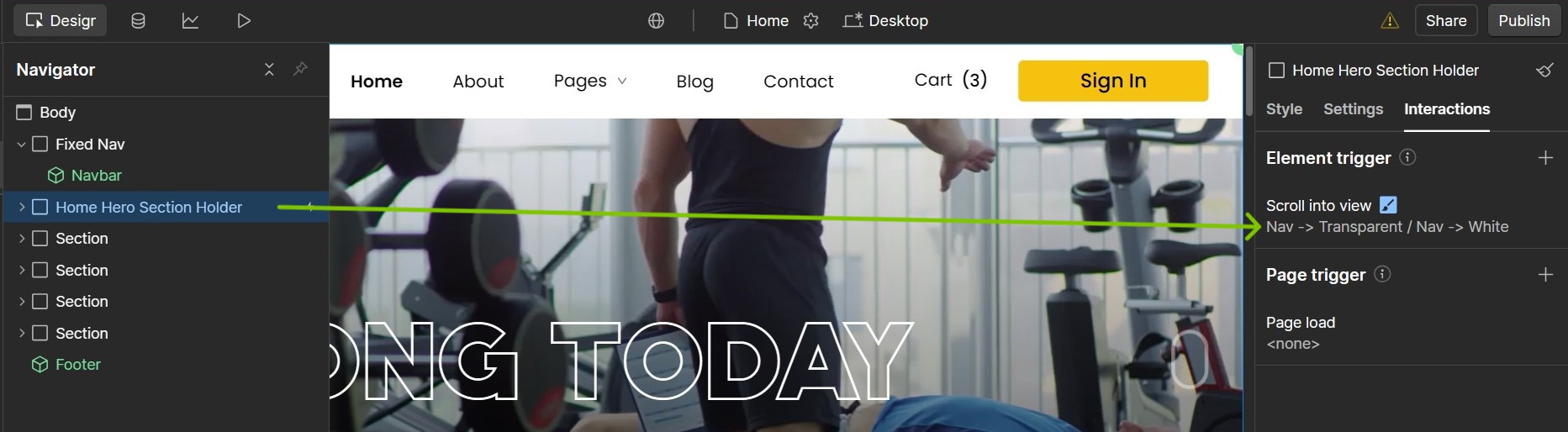
If you check the homepage, the Home Hero Section Holder element has an interaction setup (you can find this under interactions tab and by selecting the version as ‘Classic interactions’ at the bottom of that tab). The interaction highlighted below is changing the navbar element’s background to transparent as soon as it comes into view and sets it to back to default white background once it scrolls out of the view.
You can modify or remove that interaction from your Hero section element, if it’s no longer needed. And you should be able to see your navbar as per your design requirements.
That’s happening because the template has a scroll/hero-triggered interaction on the navbar. Check the interactions panel for the hero section , remove or edit the one that makes the navbar transparent on page load, and it’ll stay white with black text.