
Hi Guys,
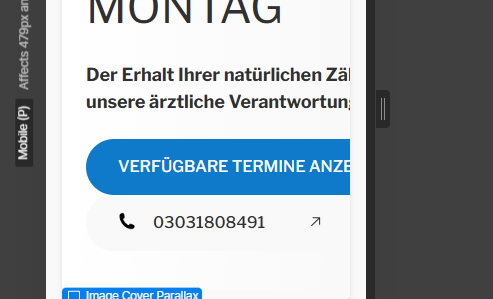
I created a new button but now it is not shrinking if I switch to different screen sizes.
Could you please help me out - I am quite new to weblfow …
Here is the sandbox link:Webflow - Version Neu Conversion Max
Hi Guys,
I created a new button but now it is not shrinking if I switch to different screen sizes.
Could you please help me out - I am quite new to weblfow …
Here is the sandbox link:Webflow - Version Neu Conversion Max
Hi there, when you click the mobile icon change the left and right padding to 1 rem and the font-size of your button text to .75 and it will fit the screen. You may need to change the padding and font-size for each screen size to have it look correct in those views.
Hi, thanks a lot.
Seemingly it is still not working.
I followed your instructions but the button just got smaller, also there is already a 1rem padding on the button color black div block. Maybe I constructed the button just too complicated…
Ok, I thought you were trying to get it to shrink smaller on mobile based on your comment “it is not shrinking if I switch to different screen sizes”. Wrapping the text might be an option if you don’t mind the button getting taller. Another option is to make the font-size smaller and use wrap and maybe you can keep it to 2 lines of text.

