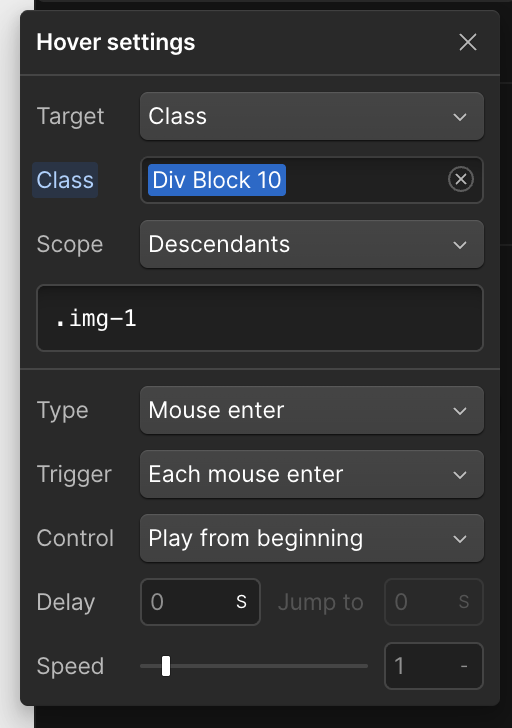
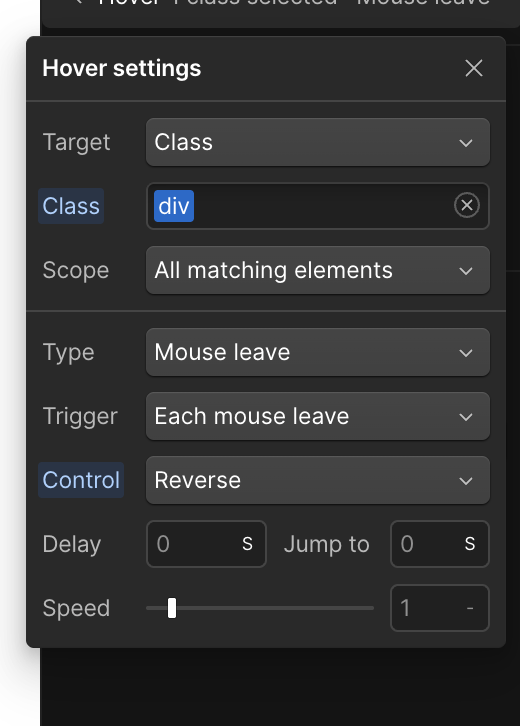
Hi All, I am having issues with GSAP and Hover interactions.
So I have a grid of images, which I’ve created a hover animation and then copied the divs across my grid, thinking I just need to change the photo and titles and I’m done. but no. I can’t figure out how to have them trigger only when specifically Hovered over. They’re triggering all together, or not at all.
Can anyone explain what’s going on and how to have them trigger only when the specific div is hovered? Any help would be greatly appreciated.
To prevent hover interactions from triggering simultaneously across your grid, you’ll need to adjust the animation scope in your Interactions panel. Here’s how to fix it:
Open the Interactions panel
Locate your hover animation settings
Find the “Class” section
Select “Only children with this class” option
This setting ensures the animation only affects elements within the specific div being hovered over, rather than triggering all instances across your grid simultaneously.
Hopefully this helps! If you still need assistance, please reply here so somebody from the community can help.
It doesn’t seem to work. Not sure if there is a bug? Shouldn’t be this difficult. lol Maybe I’m doing something wrong? but, I’ve spent hours changing all the options to no avail. Would be cool to see someone build a gridd with cards. Having the main div be the hover trigger only, and have it animate a black overlay on a photo or animating the card text etc..
Just to update. I’ve recreated my hover animation using gsap code thanks to Claude AI, and it’s working perfectly. I don’t know if there is a bug with the selectors? or if I was doing something wrong?
Hello @Aaron_Capture,
So if you want to animate multiple elements on hover you have to specify which elements you want to animate each time you hover over a trigger element. You also have to add two triggers, one for hover in and one for hover out. Something like this:
Hi Pablo, Thanks for the reply. I did do this, but I didn’t know what to specify for the scope. Could that be why I couldn’t get the hover to trigger on just the one card? I’m going to give this a try. Thank you.
Would I specify all the elements affected in the scope? eg. my overlay & title classes?