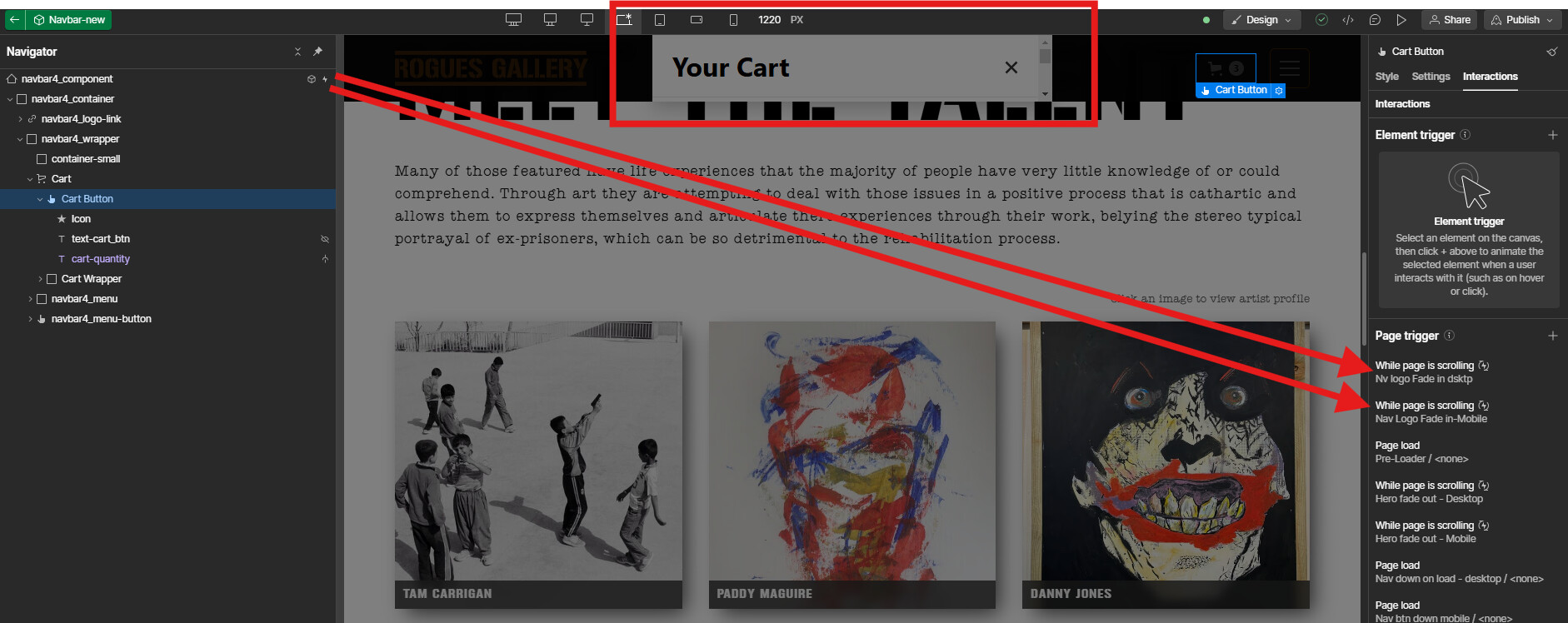
Got a bit of a strange issue here that has seemed to have just randomly appeared. Whenever I open the cart on the live preview or published site, it seems to be cut off by the nav-bar. There doesn’t seem to be an overflow:hidden causing this so unsure if this is a bug or not?
I’ve also noticed that when I select the cart button in the designer and click “open cart” the issue isn’t there.
Read only link is below if anyone could please take a look?
Nevermind just figured it out, I had the nav menu animating from off screen and taking that off solved the problem. Unsure why this is the case as it was just a transform move animation but leaving this comment here in case someone else has a similar issue.
I ran into the same problem, and this works for me. However, it’s pretty frustrating that I cannot use the animation since I think it improves usability.
I’m having this same issue… a navbar that has a simple transform move on / off the screen on scroll. It seems to be cutting off the cart at the height of the ‘Cart Wrapper’, which automatically fills the height of the navbar.
It’s only happening on my ‘fixed-nav’, the one that follows you down the page. The static one at the top works fine.
Same issue here in late 2024. I checked my backups (one from 7 hours ago before I added an interaction to the nav) and tested it. As soon as I add an interaction to the nav, it breaks the cart which then only shows within the nav at the top, so i 100% know what did it, however if I remove the animations the issue still exists. Don’t want to go back 7 hours of work
Turns out this was due to having backdrop filter involved, specifically in a parent div (the navbar) of the cart. I removed the backdrop filter from the nav, which was obsolete anyway and removed the backdrop filter from the interaction too, and all is well.