I have a bio image on my site and I’ve rounded it using border-radius. I put a box-shadow on it that displays properly in the designer and on my browser on PC. I go to look at it on my iPhone running iOS 18.5 and the box shadow doesn’t appear rounded. It takes on the shape of the original image (squarish) leading to a very frustrating final product.
I have a friend that says it looks normal on his Android device too. I’ve tried Safari, Chrome, Edge, Firefox, and Brave and they all work on PC but not on my iPhone. I’ve googled extensively for other options. Apparently Apple doesn’t work well with box shadows. I’ve tried -webkit-appeance: none; and that had no effect. I’ve tried wrapping the image in a div and putting the box shadow on the div and that had the same effect. I thought maybe I had set something in the parent container or the media query that was causing it to bug but I can’t find anything relevant.
What’s funny is that I can use the same class and same styles as other images on the page that work perfectly and it still shows up messed up. Don’t have a clue what I’m doing wrong. Any help is appreciated.
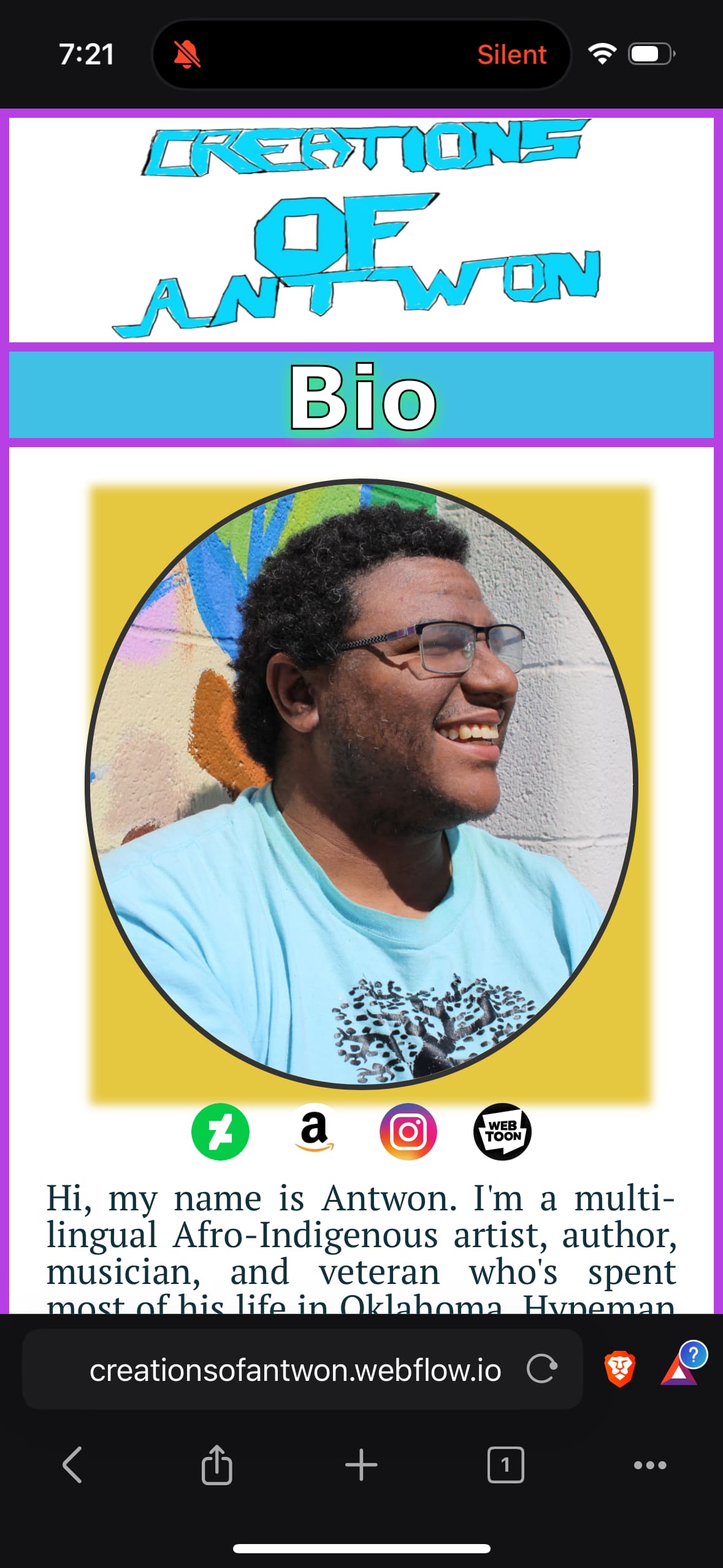
This is the effect I’m talking about.

Box shadow works fine on other rounded images on the page.
Here is my site Read-Only: LINK