I am very confused with the new GSAP Interaction, Want to try to do a Simple Click on a button (.tab_button) and the children arrow(.tab_button_arrow) rotate, but if i select “class” than it will be the same as “all elements match this class” cause all the children of .tab_button will be animated.
if i select “same as trigger target” scope with children it will animate all the children elements, no way to select the class
From the glossary
https://help.webflow.com/hc/en-us/articles/42861691922963-Webflow-interactions-with-GSAP-glossary#h_01JZSDNTC0B0HTH38A3G9NHZKM
Advanced scopes (requires an additional selector):
Descendants: All descendants that match a selector you specify
Ancestors: All ancestors that match a selector you specify
First descendant: The first descendant matching your selector
First ancestor: The first ancestor matching your selector
Example:
You have a button with class .trigger-btn inside a card. When clicked, you want to animate:The card’s title (.card-title) –– use scope “First ancestor” with selector .card
All icons inside the card –– target .icon with scope “Descendants” and selector .card
The next card in the list –– target .card with scope “Next sibling”
the example seems to be what i wanted, but I can’t understand the “target .icon with scope “Descendants” and selector .card” this part

is this what suppose to look like?
or this?
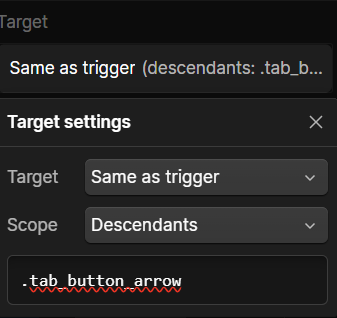
I try to change the custom selector to class with and same scope but neither will target the the .tab_button_arrow
I feel very dumb about it, and GSAP help doc doesn’t really help neither cause i’m not much code genius. and it mix with React and others. I can’t find a direct answer of it
please help
